Zabbix采集dell存储硬件性能数据

背景

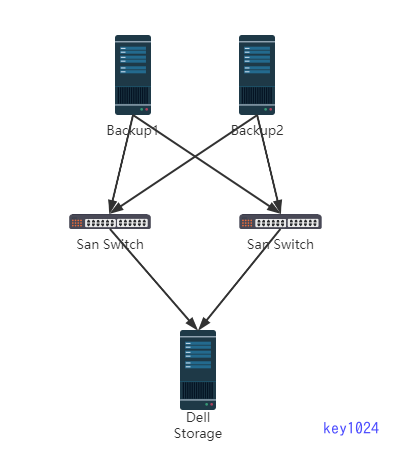
客户物理服务器的备份解决方案使用Veritas,Veritas服务器挂载本地Storage作为备份存储。

1
2
3
1. 由于zabbix官网上没找到对应型号的dell storage监控模版,测试默认snmp模版未能正常采集出需求数据,随查询Storage官网有对外api接口,通过api接口获取需求数据。

2. San Switch官网找到的监控模版只能采集CPU、内存无法采集端口流量及端口(UP、Down)状态。通过SNMP MIB找到对应OID手动添加监控项采集出对应数据。

部署架构

采集Storage数据

  • 存储健康状态
  • 总存储空间
  • 存储空间利用率
  • 存储池IOPS及读写速度
1
2
# 官网api接口文档
https://www.dell.com/support/manuals/zh-cn/powervault-me4012/me4_series_cli_pub/api-basetype-properties?guid=guid-17e185ac-2463-42d6-8a11-372b75545b82&lang=en-us
1
2
3
4
5
6
7
8
9
10
11
12
13
14
15
16
17
18
19
20
21
22
23
24
25
26
27
28
29
30
31
32
33
34
35
36
37
38
39
40
41
42
43
44
45
46
47
48
49
50
51
52
53
import sys,string
import requests
import json
import hashlib
from requests.packages.urllib3.exceptions import InsecureRequestWarning
requests.packages.urllib3.disable_warnings(InsecureRequestWarning)

# 定义变量
url1 = "https://10.*.*.16"
url2 = "https://10.*.*.17"
path1 = "/api/show/volumes"

def info():
url = url1
auth_string = hashlib.sha256('***_***'.encode('utf-8')).hexdigest()

# Login and obtain the session key.
headers = {'datatype': 'json'}
r = requests.get(url + '/api/login/' + auth_string, headers=headers, verify=False)
request = json.loads(r.content)
sessionKey = request['status'][0]['response']

# Obtain the health of the system
headers = {'sessionKey': sessionKey, 'datatype': 'json'}
r = requests.get(url + '{}'.format(path1), headers=headers, verify=False)
response = json.loads(r.content)
return response

def volumes(Data):
total_size = Data["volumes"][0]["total-size"][:-2]
allocated_size = Data["volumes"][0]["allocated-size"][:-2]
health_numeric = Data["volumes"][0]["health-numeric"]
#disk_utilization = '%.4f' % (float(allocated_size) / float(total_size))
disk_utilization = '{:.2%}'.format(float(allocated_size) / float(total_size))[:-1]
if Param == '0':
print('%.3f' % (float(total_size)/1000))
#return '%.3f' % (float(total_size)/1000)
elif Param == '1':
print('%.3f' % (float(allocated_size)/1000))
#return '%.3f' % (float(allocated_size)/1000)
elif Param == '2':
print(health_numeric)
return health_numeric
elif Param == '3':
print(disk_utilization)
return disk_utilization
else:
print("pls input for:total_size/allocated_size/health_numeric/disk_utilization")

if __name__ == '__main__':
Param = sys.argv[1]
Data = info()
volumes(Data)
1
2
3
4
5
# cat get_storage.conf 
UserParameter=total_size1,python3 /data/zabbix/zabbix-server/scripts/storage-volume1.py 0
UserParameter=allocated_size1,python3 /data/zabbix/zabbix-server/scripts/storage-volume1.py 1
UserParameter=health_numeric1,python3 /data/zabbix/zabbix-server/scripts/storage-volume1.py 2
UserParameter=disk_utilization1,python3 /data/zabbix/zabbix-server/scripts/storage-volume1.py 3

zabbix上配置对应监控项,根据需求添加触发器和图形

采集San Switch数据

  • CPU、内存利用率
  • 接口带宽流量
  • 接口状态
1
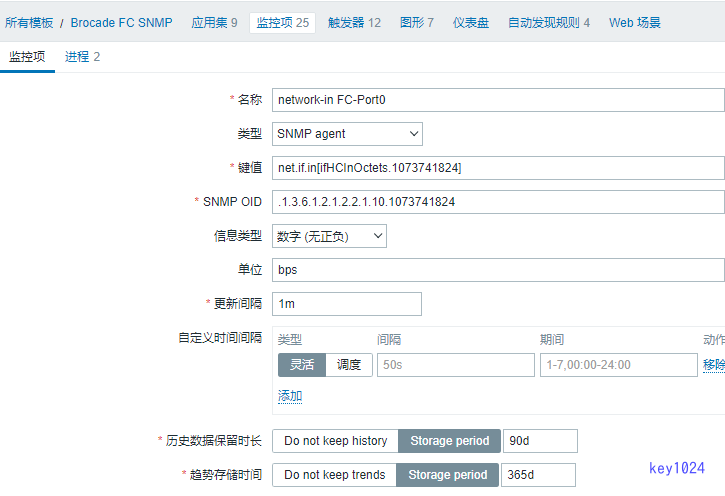
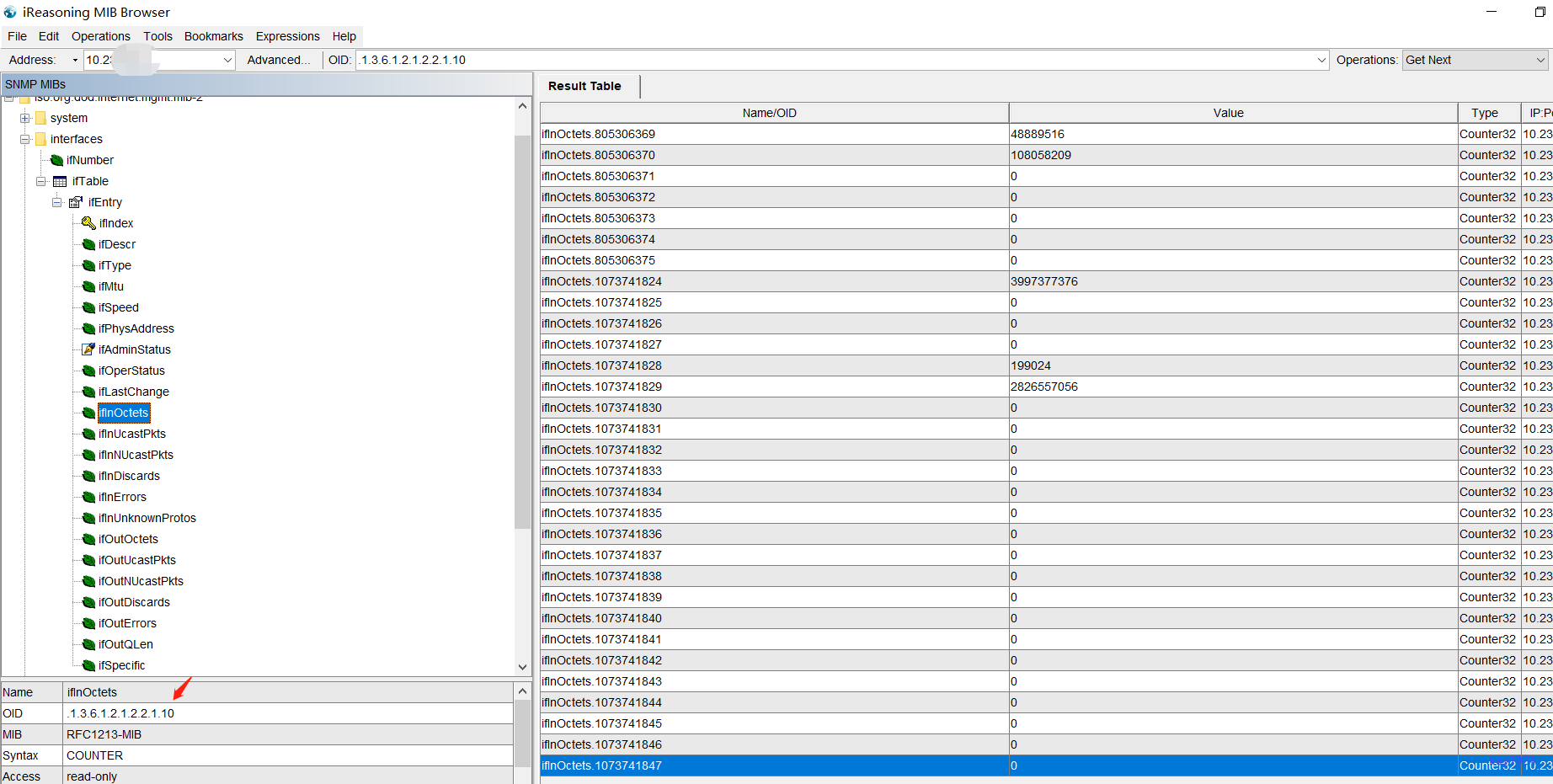
由于默认目标无法采集到FC端口,故通过SNMP MIB找到对应接口的OID手动添加监控项采集数据。
  • 通过MIB工具获取SNMP数据(企业版很好用,输入硬件设备IP即可获取到对应SNMP MIBs信息)
  • 添加监控项

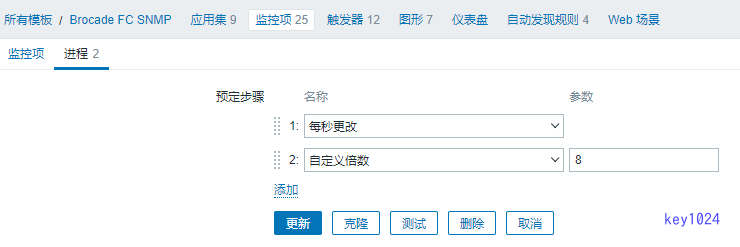
注意:接口带宽数据需添加进程步骤,每秒更改和自定义倍数,否则获取到的数据是累加结果。

-------------本文结束感谢您的阅读-------------
原创技术分享,感谢您的支持。